PDF compression can shrink the amount of storage space a document consumes and make it easier to upload, download, or share. Before compressing an integral document, users should check the converted file to make sure text, images, tables, and other features remain sufficiently clear for their planned use.
How to Make PDFs Easier to Share, Fill, and Manage
 Written By Rishika Agrawal
 Reviewed By: Khushi Choudhary
PDFs are effective as they keep documents looking uniform across devices, but managing them can be a bit challenging when files are heavy, scanned, or need many updates. Businesses might also ask to collect data, request signatures, define various documents and protect sensitive content.
The right approach begins with a clear understanding of what each document needs. One can also use tools to compress PDF for free when reducing file size can make a document easier to handle without changing its purpose.
Keep reading to explore how to make PDFs easier to share, fill, and manage.
Why PDF File Size Matters
A PDF can become unexpectedly large when it packs scanned pages, photographs, graphics, or other high-resolution components. Large files can take longer to upload and download and may create interruptions when a website, email service, or document-management system has file-size rules.
Compression can be useful when the motive is simply to make an existing document easier to transfer or store. Before reducing a file, it is worth considering whether the document contains details that must remain clearly readable. This is specifically important for forms, scanned agreements, identification-related paperwork, and documents that carry small text.
Compression is therefore one part of a much larger document workflow. Once a PDF has an adequate file size, users may still need to edit its contents, add information, request signatures, or organize different documents into a single file.
Editing Existing PDF Documents
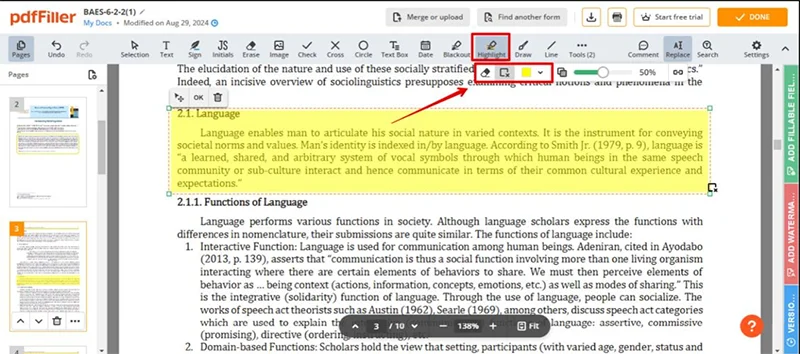
A PDF editor can be useful when a document calls for changes after it has already been created. Instead of rescuing the document from its original source, users can work directly with PDF products.
pdfFiller supports editing text and content inside PDF files, along with providing images, comments, stamps, and annotations. These skills can be useful when preparing business documents that involve small revisions or additional content.
For example, a real estate professional may find a property document that needs an updated section or an annotation before it is sent to another customer. Similarly, an HR team may need to polish an existing document before sending it through an internal approval process.
Turning Documents Into Fillable Forms
Many organizations repeatedly acquire the same types of information. Patient intake paperwork, employee onboarding documents, real estate forms, insurance invoices, and business applications are examples of records that can benefit from structured fields.
A fillable form allows users to enter information directly into defined areas instead of printing a document and completing it with their fingers. pdfFiller can be used to build and publish fillable forms, giving organizations a way to turn blank documents into interactive forms.
A useful workflow begins by clarifying what information needs to be collected. Fields can then be positioned according to the structure of the starting document. Clear labels and logical field placement can make the form easier for participants to complete and review.
This approach can also help organizations achieve consistency when the same type of document is used several times.
Also, learn how influencers are using AI video tools to post more without burning out.
Working With Scanned Documents
Not every PDF initially begins as editable digital text. Some documents are created by scanning printed paperwork, which can make the content difficult to modify or search.
Optical character recognition, or OCR, can convert scanned material into editable text. This can be particularly useful when an organization needs to comply with an older document that exists only as a scan.
For example, an office may have a batch of archived forms that were originally completed on paper. Rather than recreating every document from scratch, OCR can offer a starting point for making scanned content editable.
OCR should still be followed by intensive review. Formatting, characters, numbers, and specialized terminology should be validated against the original document before the edited version is used.
Managing Multiple Documents
Business workflows often involve more than one PDF. A single assignment may contain several forms, supporting documents, signed pages, and supplementary materials.
pdfFiller supports merging, splitting, rearranging, and juxtaposing PDF documents. These functions can help users organize related information without moving around between different files.
For example, a construction company might need to assemble project paperwork into a logical sequence before sharing it internally. An insurance workflow may consist of several documents that need to be reviewed together. A legal professional may also need to differentiate between versions of a document while preparing an agreement.
Keeping related material separated can make review easier and reduce confusion about which file represents the most recent version.
Sending Documents for eSignature
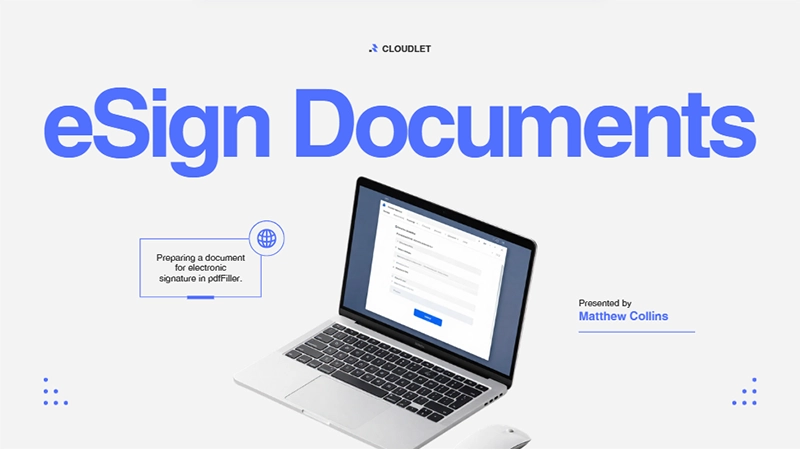
Electronic signatures can alleviate the need to print, manually sign, scan, and return documents. pdfFiller facilitates certificate-based eSignatures and provides audit trails for signature-related transactions.
Its eSignature capabilities are enforced in line with the ESIGN Act, UETA, eIDAS, and GDPR. In the United States, the ESIGN Act and UETA provide legal permission for electronic signatures under their applicable statutes.
A typical workflow may involve designing a document, adding the required signature fields, identifying the participants, and presenting the document for signature. The recipient can then complete the chosen fields electronically.
Using Documents in Different Business Settings
PDF workflows vary greatly between industries. A real estate office may work with leases, speech acts, and purchase-related documents. Healthcare organizations may use patient intake and consent forms. HR departments may coordinate offer letters, onboarding paperwork, and policy confirmations.
Accounting and tax professionals may work with standardized forms and supporting records, while legal teams may manage statements such as NDAs, affidavits, and engagement letters. Construction and insurance teams can also profit from digital forms that can be completed while working away from a typical office.
The important issue is not simply whether a document can be converted into PDF format. The workflow should also account for how evidence is entered, reviewed, signed, stored, and shared.
Protecting Sensitive PDF Information
Business documents can contain exclusive information, so document security should be considered throughout the workflow. pdfFiller states that it uses 256-bit AES encryption for data in transit and at idle stages.
The platform also provides offerings such as two-factor authentication, per-document password protection, additive signer authentication, and document expiry dates. Its Audit Trail records document activity such as who visited, edited, signed, or shared a document, collectively with timestamps and IP addresses.
pdfFiller states that documents stay in the user’s private account, are not shared with third parties, and are not used to train AI models. Its infrastructure is constructed in SOC 2 Type II-certified data centers with 24/7 threat detection.
For organizations handling strictly prohibited information, pdfFiller also states that it supports SOC 2 Type II, GDPR, CCPA, PCI DSS, and FERPA compliance, while HIPAA support is available with a signed BAA on specific plans.
Sharing Forms Through a Web Link
Some workflows involve more than sending an attachment by email. Organizations may want recipients to inspect a document through a web-based link and submit details electronically.
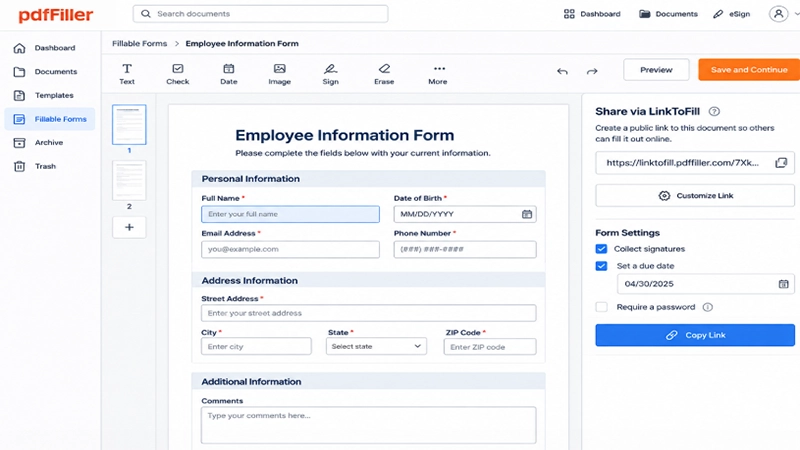
pdfFiller’s LinkToFill tool can turn a document into a public web link that collects signatures and data. This can be useful for cases where multiple recipients struggle to access the same type of form.
For example, an organization could create a standardized form and distribute its link rather than repeatedly sending specific copies of the document. The form can then become part of a more precise digital workflow.
A Practical PDF Workflow
In the end, managing PDFs involves much more than lowering the file size. Various documents need alternative solutions, from compression and direct editing to OCR and eSignatures.
The most useful workflow is the one that aligns with the task without adding extra steps. By selecting the right tools for sharing, collecting data, signing and storing documents, one can make PDF management simpler and more organized.
Also, learn what influencer marketing ROI is and how to calculate it.
Frequently Asked Questions
What is the easiest way to reduce the size of a PDF?
Can a PDF be edited after it has been created?
Yes. A PDF editor can empower users to make changes intuitively within an existing PDF. pdfFiller enables editing text and content, as well as submitting images, comments, stamps, and annotations. This can be appreciated when a document needs a makeover without rebuilding the given file from its original source.
Can scanned PDFs be converted into editable documents?
OCR can recognize text stored in scanned PDF pages and convert it into editable text. pdfFiller supports OCR for scanned files. After conversion, users should go over the resulting text carefully because recognition can occasionally depend on corrections, especially when documents contain small text, unusual formatting, tables, or specialized expressions.
Can PDFs be used as fillable forms?
Yes. A static PDF can be converted into a fillable form by adding fields for information such as names, dates, signatures, or other mandatory details. pdfFiller supports creating and publishing fillable forms, allowing organizations to collect records electronically instead of relying on manually finalized paper documents.
Are electronic signatures supported in pdfFiller?
pdfFiller supports eSignatures and certificate-based eSignatures with verification trails. Its eSignature capabilities are expected to work in line with the ESIGN Act, UETA, eIDAS, and GDPR. The appropriate legal framework depends on the setting and jurisdiction in which an electronic signature is employed.
Can PDFs be managed on mobile devices?
pdfFiller is available as a web application as well as iOS and Android apps. This allows users to complete tasks with PDF documents across multiple types of devices. Mobile access can be useful for tasks where documents need to be reviewed, completed, annotated, or operated away from a desktop computer.
Rishika AgrawalRishika is a content writer experienced in brand development, influencer marketing, and digital marketing. Having worked in the industry of Influencer Marketing for over two years, she has written several blog posts and guides on influencers that have made different brands more aware and interact more with their audience.
Related Posts