Ans: Yes, free tools work, and you can upgrade them later for advanced features.
Best Graphic Design Tools in 2026 for Creators and Social Media Influencers
 Written By Shilpi Samantray
 Reviewed By: Khushi Choudhary

“Design is the silent ambassador of your brand.” –
Paul Rand (American art director and graphic designer)
A creator’s aesthetics are their greatest asset; however, succeeding now in 2026 requires more than just creativity. It demands efficient and advanced tools.
The influencer landscape has evolved because the creators must leverage streamlined technology for various benefits. It can be helpful to grow your Instagram engagement.
The creator economy has experienced this shift because its value will increase from $191 billion in 2025 to $528 billion by 2030 due to the demand for high-quality, unique content.
The most effective design tools, like VistaCreate, which currently exist, should be explored because they boost your success in this competitive and fast-growing industry.
Key Takeaways
- Brand consistency is easily managed through automated ‘Brand Kits’.
- Agile, AI-driven tools are replacing traditional, heavy software.
- Premium tools are a worthy investment once you begin monetizing your content.
Top Graphic Design Tools Influencers Are Using in 2026
Top influencers use agile tools for fast, premium content creation. Check out the best five tools mentioned here:
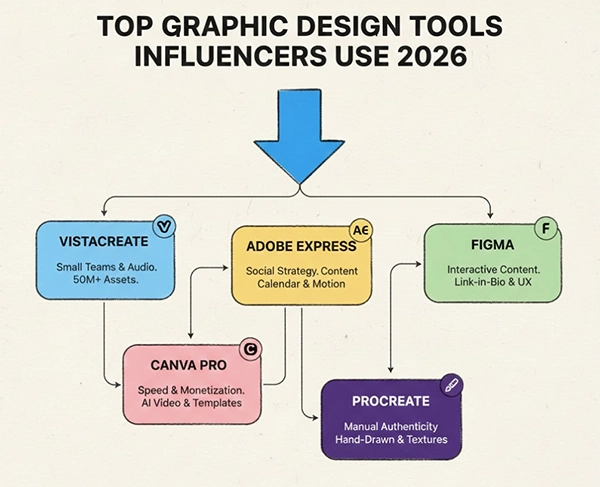
- VistaCreate: It has flexible templates, bold assets, and AI tools for quick, striking, and trend-driven social media content.
- Canva Pro: It is a drag-and-drop platform with many templates, and AI resize for quick and consistent daily content creation.
- Adobe Express: You’ll get simple Adobe-style templates for quick graphics and lightweight video creation without any complex design skills.
- Figma: Real-time collaboration, cloud workflows, and brand kits for teams managing consistent, scalable content production.
- Procreate: It is ideal for iPad creators, offering digital painting and unique hand-drawn visual aesthetics.
Pro Tip: Use premium stock libraries such as Depositphotos for high-quality and authentic visuals.
Key Features Creators Should Look for in Design Tools
Before investing, you need to understand the essential features that actually impact your daily creative workflow and productivity.
Templates
You need to manage your time because it is not possible to begin from scratch every day.
Your organization needs a comprehensive library of templates you can customize and that includes content formats and campaigns. The process requires delivery of content that remains both fast and visually appealing to users.
AI Features
Modernize your workflow with native AI capabilities. The magic eraser and generative fill tools, combined with the background remover, allow you to finish your editing task three times faster. This leaves you with time to develop new ideas and create more content.
Fun Fact: Over 80% of influencers are using smartphones for half their design work on the go.
Social Media Optimization
Your selected tool must offer native export functions that deliver Reels, YouTube Shorts, and Reels content in the exact platform dimensions.
Besides this, it should also preserve visual quality and support various compression methods. The aspect ratio should be maintained, along with providing various resolution options and quick preview capabilities.
AI-Powered Design Tools Changing Content Creation
We have entered a new era where AI functions as an individual design partner.
- Automation: The process allows users to create a complete month of Pinterest content with a single text prompt.
- Smart Editing: Users can now complete both subject tracking work and color grading with a one-click operation.
- Visual Consistency: Your brand’s visual style now gets applied automatically to all upcoming assets because machine learning algorithms learns from your visual history.
Tips to Maintain Brand Consistency Across Platforms
Consistency builds trust, and trust grows your brand and builds an audience. To maintain it, you are supposed to:

- Stick to a strict palette of 2-3 core brand colors.
- Lock in a ‘Brand Kit’ within your design tool so that you never accidentally stray away from your visual identity.
- Use the exact same 1-2 fonts on your YouTube thumbnails as you do on your Instagram stories.
By incorporating proper ideas, you can stand out in the Amazon Web Services (AWS) outage.
Budget-Friendly vs Premium Design Tool Options
You don’t have to break the bank to achieve an attractive appearance. Beginners can access extensive resources from the free versions of contemporary design software.
You may as well use CorelDRAW’s suite of tools, which includes powerful features, and 87% of users say they’d recommend it to others.
After you exceed 10k+ followers, switching to a premium tier provides an immediate return on investment. A premium tier that costs between $10 to $20 each month. The system offers access to advanced artificial intelligence tools, premium video content libraries, and extensive cloud storage capabilities.
Did You Know? The human brain has the ability to process entire images in as little as 13 milliseconds.
Trend of 2026: AI Graphic Design Tools
As we navigate 2026, the biggest trend is not just AI; it is the AI technology that operates without a visible presence.
Users remain unaware of their machine learning activities that help them create visual compositions and select text styles, as the tools have become so integrated into their daily tasks.
The fast and intuitive system delivers professional-grade capabilities that help users make better choices while creating their work and achieving higher standards of creative output.
Frequently Asked Questions
Ques: Can I begin with free graphic design tools?
Ques: Is it necessary to have a design degree to use these tools?
Ans: No, they are simple to use and have easy features.
Ques: How is AI helpful with visual consistency?
Ans: AI applies fonts, filters, and colors from past posts.
Related Posts